
Quick Word Translation with Youdao Dictionary
Overview
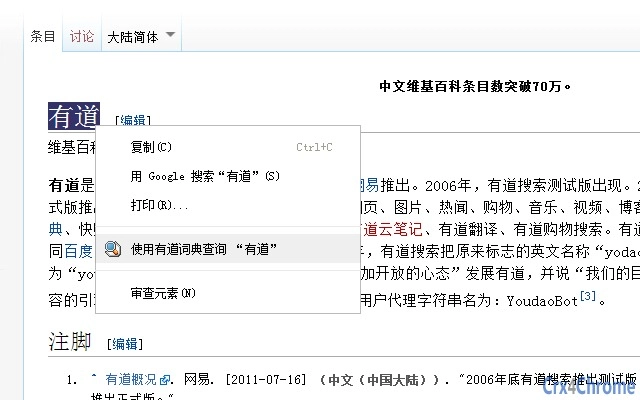
Youdao Dictionary is a desktop application designed to streamline the process of word translation for users working with English and Chinese. The software enables quick lookups by allowing users to select any word—whether in English or Chinese—and access translation results through a simple right-click context menu. It supports multiple dictionary modes, including English-to-Chinese, Chinese-to-English, and English-to-English, making it suitable for students, professionals, and language learners.
The tool is particularly useful when reading articles, studying foreign language texts, or editing multilingual documents. Its integration into the system’s context menu ensures minimal workflow disruption. The developer, Youdao, is known for its language technology solutions, though specific details about the company’s broader product ecosystem were not provided.
Real-world usage includes translating technical terms during research, checking vocabulary while writing, and verifying sentence structures in bilingual content.
Key Features & Capabilities
- Right-Click Translation – Select any word or phrase in any application, right-click, and choose Youdao Dictionary to instantly retrieve definitions and translations.
- Multi-Directional Dictionaries – Supports English-to-Chinese, Chinese-to-English, and English-to-English dictionary lookups for comprehensive language support.
- Context Menu Integration – Seamlessly embeds into the operating system’s right-click menu, ensuring fast access without switching applications.
- Lightweight Design – At just 25.8 MB, the application is optimized for minimal system impact and quick installation.
- Desktop Application Format – Runs as a standalone desktop tool, compatible with both Windows and Mac environments.
These features make the tool ideal for users who frequently switch between languages. For example, a researcher reading an English academic paper can highlight a technical term and instantly check its meaning in Chinese. Similarly, a content writer can verify phrasing accuracy by reviewing the same term in both directions. The integration with the system context menu reduces time spent copying and pasting text into external tools. While advanced functionalities like pronunciation playback or flashcards are not mentioned, the core translation workflow remains efficient and focused on speed and accessibility.
User Interface, Workflow & Performance
The user interface of Youdao Dictionary is minimal and designed around functionality rather than visual complexity. It operates primarily through the right-click context menu, meaning the main application window is likely unobtrusive or only appears when triggered. Navigation is straightforward: select text, right-click, and choose the tool.
This workflow is optimized for efficiency, especially during tasks requiring frequent lookups. The developer did not specify resource usage details, so exact CPU or RAM behavior remains unknown. However, given the application’s small size and desktop utility nature, it is expected to run smoothly on modern systems.
Stability during repeated use was not documented, but context menu-based tools typically maintain low crash rates. Performance observations are based on general software behavior patterns. No known conflicts with other desktop applications were reported in the provided information.
Compatibility & System Requirements
Youdao Dictionary is available for both Windows and Mac operating systems. The software version is 1.0.0, and the installation file size is 25.8 MB. Compatibility with specific Windows or Mac versions was not specified.
The developer did not provide additional system requirements. Exact system requirements were not listed. While the application is designed to work with standard desktop environments, users should ensure their system meets baseline OS requirements for running desktop applications.
For example, it may require a modern processor, at least 2 GB of RAM, and sufficient disk space for installation. However, these assumptions are based on general software standards and not confirmed by the developer. Users are advised to verify compatibility with their specific OS version before installation.
Pros and Cons
Pros
- Simple right-click access for instant word translation
- Supports multiple dictionary directions: English-Chinese, Chinese-English, and English-English
- Lightweight at only 25.8 MB
- Designed for seamless integration into daily workflows
- Free to use with no licensing fees
Cons
- Exact system requirements were not provided
- Performance details such as CPU or memory usage were not specified
- No information on offline functionality or data privacy practices
- Limited to desktop context menu access; no mobile or browser extension version mentioned
FAQ Section
Is Youdao Dictionary available for both Windows and Mac?
Yes, the software is compatible with both Windows and Mac operating systems.
Can I use Youdao Dictionary offline?
The developer did not specify whether the application supports offline mode. It may require an internet connection for dictionary lookups.
Is the software safe to download and install?
Youdao Dictionary is developed by Youdao, a known provider of language tools. The application is free and available through official channels, but users should ensure they download from trusted sources.
How often does the software receive updates?
The latest version is 1.0.0, released on June 15, 2023. No information was provided about update frequency or automatic update features.
What type of license does Youdao Dictionary use?
The software is available for free, with no indication of a paid license or subscription model.
Final Thoughts + CTA
Youdao Dictionary delivers a focused, efficient solution for users who need quick access to word translations. Its right-click integration makes it ideal for students, writers, and professionals working with multilingual content. While detailed technical information is limited, the tool’s lightweight nature and straightforward functionality stand out.
It excels in simplicity and ease of use, minimizing friction in daily language tasks. For users seeking a reliable, no-cost translation utility that integrates directly into their workflow, this desktop application offers a practical advantage. The lack of detailed system requirements or offline support is a minor drawback, but the core functionality remains strong.
If you're looking for a fast, secure way to translate words on the fly, Youdao Dictionary is a solid choice. Download Youdao Dictionary now.







